
At first glance, the world of equestrian ecommerce might seem relatively straightforward. There are a number of brands which dominate the space, and as long as customers can access those, the ecommerce experience should be easy. Right?
As ever, in the ecommerce space, it’s a little more complicated than that. Whether it’s getting imagery that really resonates with customers and helps them empathise with a specific product range, or ensuring that a shopping feed makes it crystal clear about sizing or fit of a product, there are dozen things which can cost retailers that precious first click.
We’ve looked at several brands across the equestrian space and highlighted the ones that are doing well, and ones which need whipping into shape…
Saddle-up with Paid Social
Looks matter:
Equus
What works:
- Users can immediately tell that this is equestrian related and see products in action.
- CTA button takes you to the brand collection page, outlining all products available!
- High quality imagery.
Suggestions:
- Include Equus logo.
- Include brand logo (smaller than company logo) – those who know the brand will see this first (copy is secondary, creative is what stops a user scrolling).
- Name the products shown in headline.
- A little more detail in the primary text.

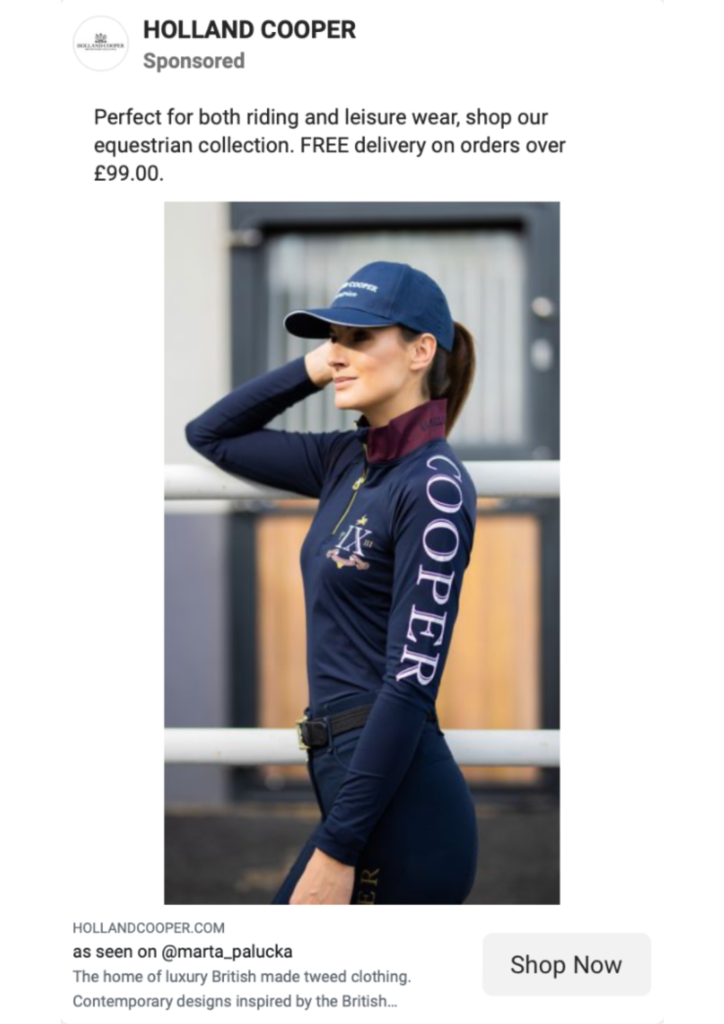
Holland and Cooper
What works:
- Great reference to the influencer shown – people in the equine community would recognise this and this adds to brand trust.
- Use of logos on the product , negating the need for the logo to be superimposed on to image.
- Copy doesn’t alienate potential customers who love equestrian aesthetics but might not ride themselves.
Suggestions:
- Resize image, 1080×1080 looks best for in-feed placement.
- Capital letter on Headline ‘As seen on…”
- Format copy by reshuffling where the CTA is within the text.
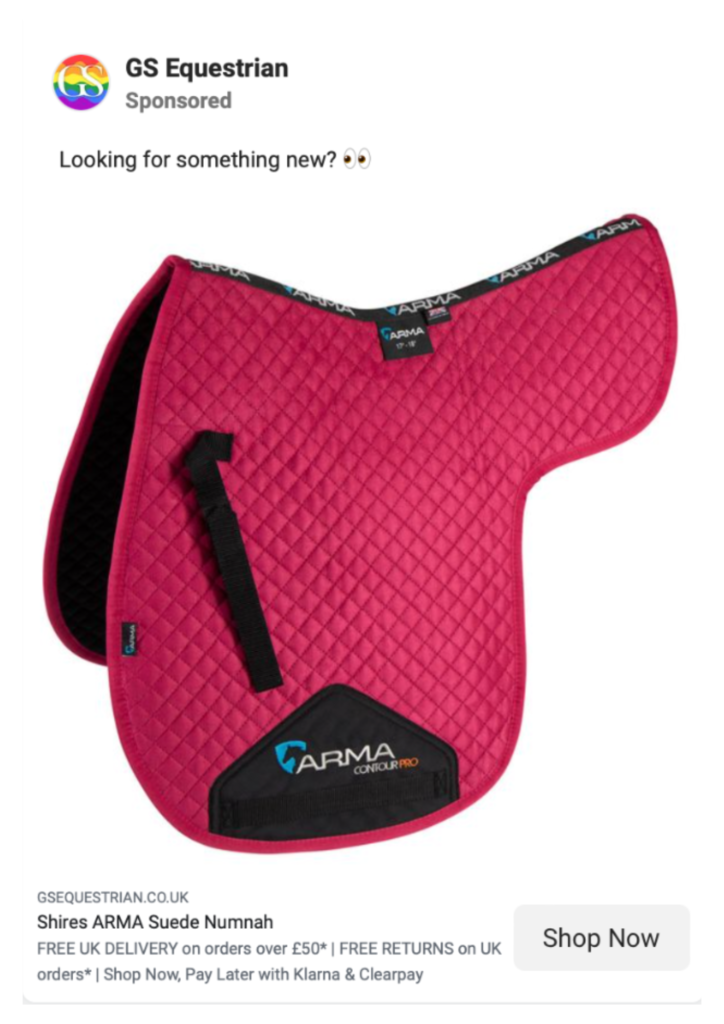
GS Equestrian
What works:
- Great use of description to add additional USPs, these could also be put into different primary text options.
- Clear product imagery.
- Landing page goes to the exact product, not just a collection page.Suggestions:
- Expand on primary text copy, mention product brand and problem it solves.
- Test copy that includes the 10% off when you sign up to the mailing list.
Targeting
So you have an amazing product and ad, but who are you going to show this to and more importantly, who’s going to convert? For anyone who doesn’t spend their life in Facebook Ads Manager, the targeting options available can seem overwhelming, because the world really is your oyster.
This is what we recommend and some ideas of how to target potential new customers:
- Segment your customers to ensure each type is getting the correct messaging and offers. Two that we would first look at engaging and then further optimising once we’ve done some learning are:
– Riders and those who enjoy the country lifestyle and fashion: brands and aspirational lifestyle shots (think your Fairfax & Favour fans).
– Horse and yard owners for product specific, think carousels and lots of mention of USPs. - Location, location, location. Now we don’t want to generalise, but we are going to imagine that most of your orders don’t come from big cities. Of course, we’d have a look at your Google Analytics to confirm this. Look more towards the Yorkshire Dales, the Cotswolds, Cumbria or Surrey. This could be a quick way of cutting waste by not showing in places you just know your customers won’t be.
- Lastly, don’t discount the importance of customer data, you can utilise this for retargeting (and upselling matching products) and lookalike audience building.
If you’re looking to find out more about how Paid Social can help your business grow online, please don’t hesitate to get in touch or even drop Hannah a message on LinkedIn!
Gallop into Google Shopping (and Search)
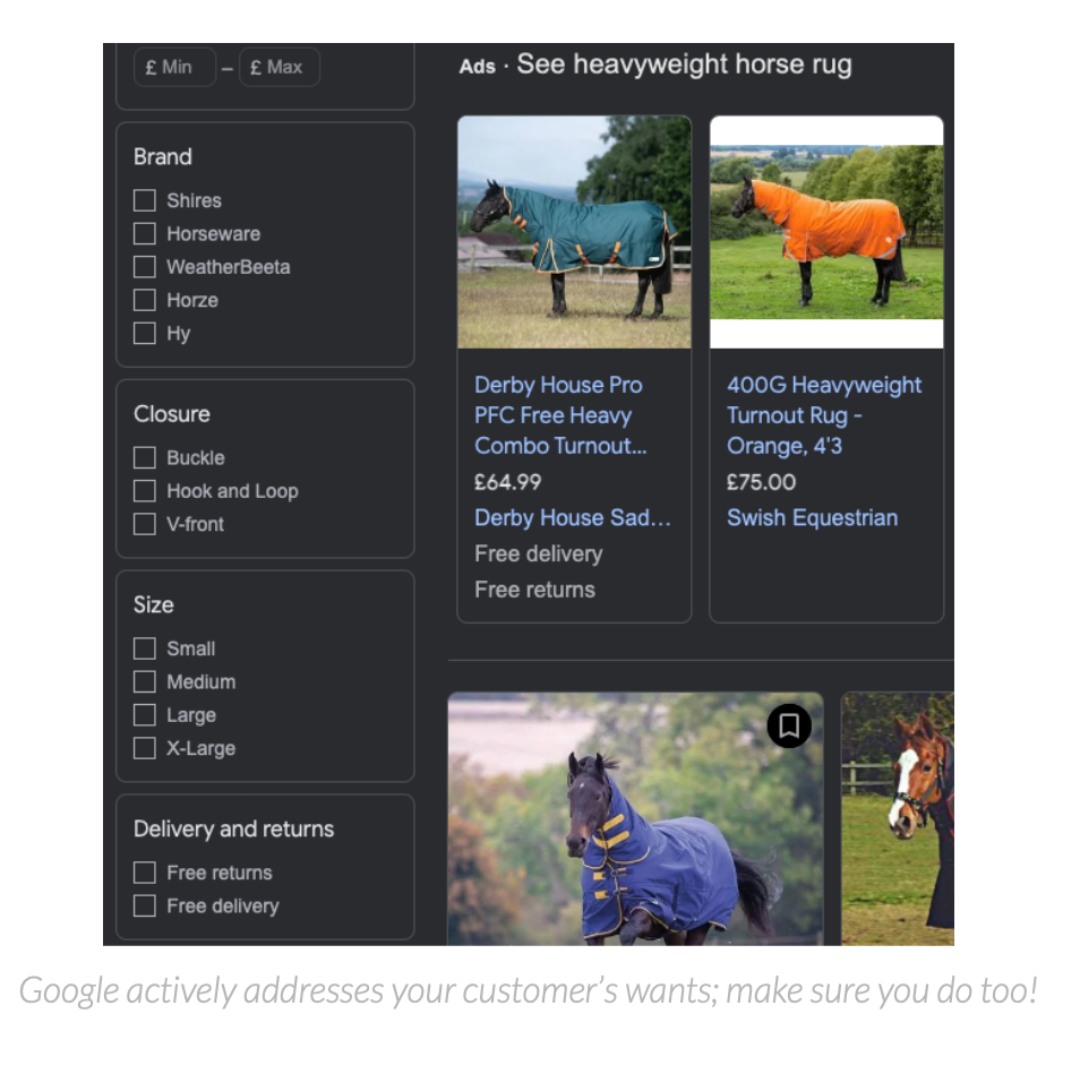
1. Nail your product feed!
Your customer knows exactly what they want to buy, and Google Shopping is designed to help them find it. Make sure your titles are as descriptive as possible and include relevant attributes like size and colour, just for a start. The Shopping tab of Google goes even further, with filters on traits like size, closure type, colour and even new/used. If your feed is missing an attribute, you’ll drop out of the listings completely when a user filters on that attribute. Nail your feed so you don’t miss out!
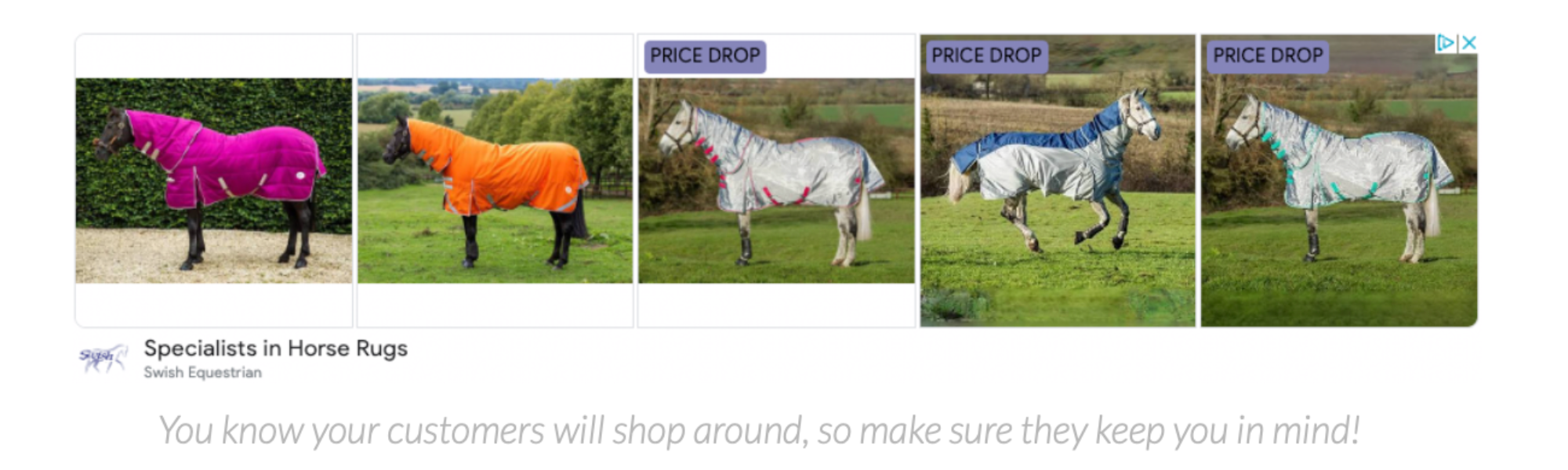
2. Don’t ignore Dynamic Remarketing
If you ever ran Smart Shopping campaigns, you’ll know that Dynamic Remarketing (carousel ads of products your customer viewed) was baked into its setup, and it was part of what made it so effective.
Standard Shopping campaigns don’t include this at all, and Performance Max (which replaced Smart Shopping) uses it much less freely than Smart Shopping ever did. Now your Smart Shopping campaigns have been replaced, you’ll need to make sure you’re running these campaigns directly or your customers will be seeing much less of you…
3. Be price competitive!
Okay, so this one’s not exactly an ads-specific tip, but if you’re running Google Ads there’s extra info you can use to hit the pricing sweet spot.
The Price Competitiveness Report in Google Merchant Centre gives you a breakdown of how you compare for your products:
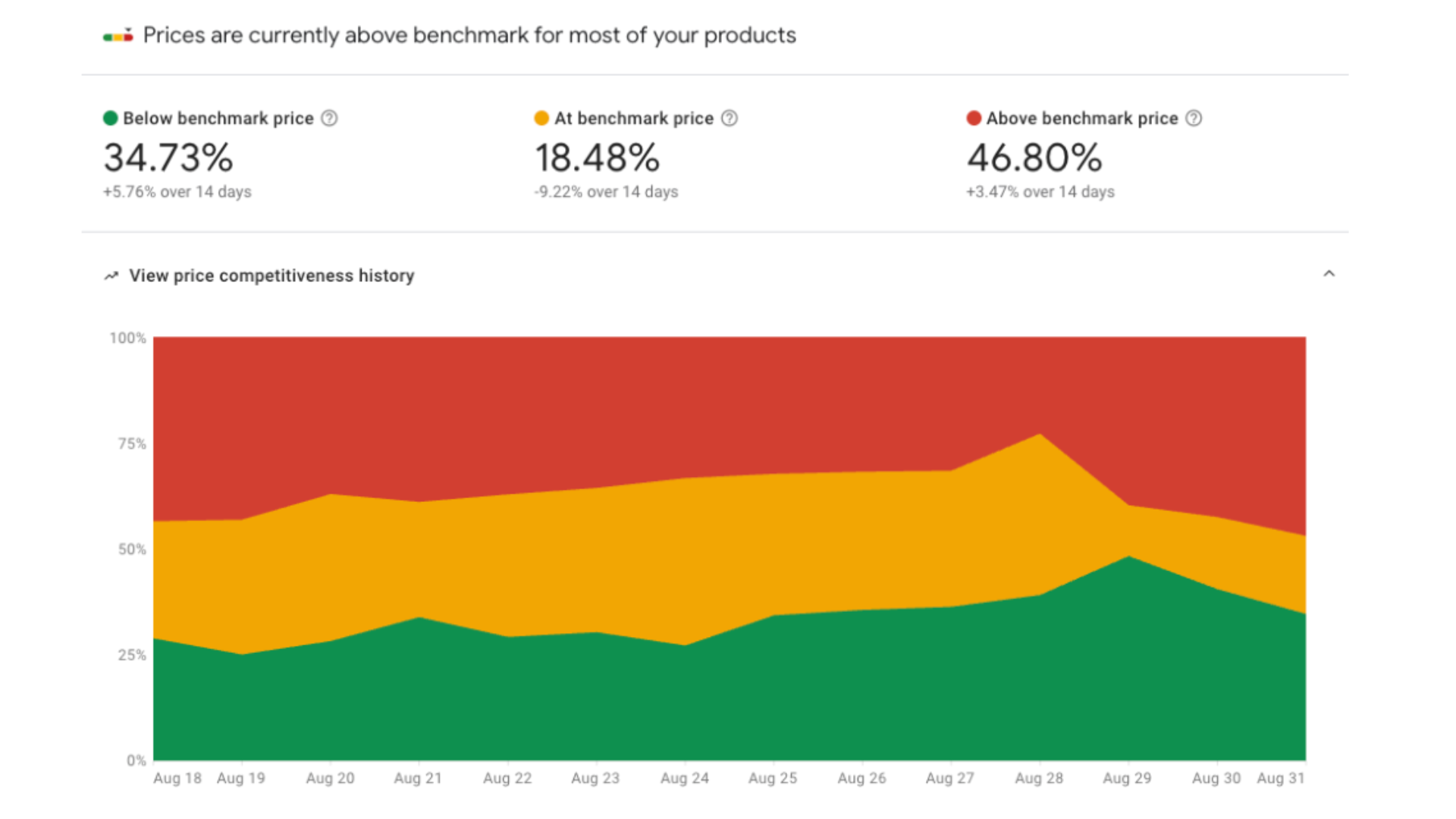
Use this (and the detailed brand/category/SKU-level reports) to see which of your key products are priced out of success on the Shopping carousel. Sure, you’re losing margin but the performance increase vs raising your bids will more than pay for itself.
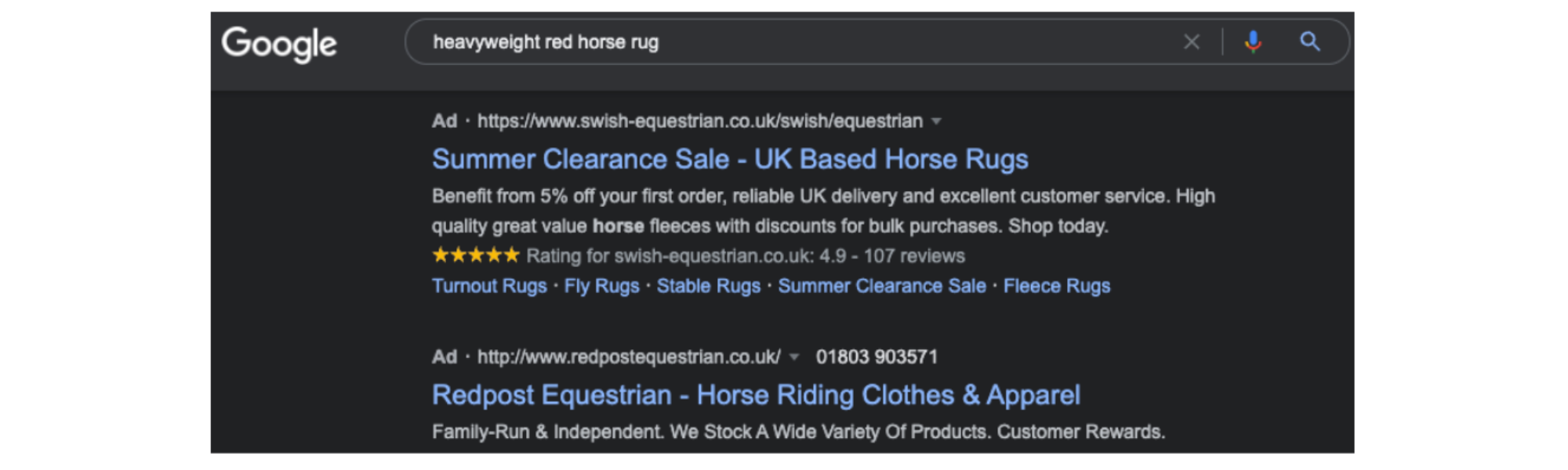
4. Nail your long-tail search strategy
One more time – your customer knows exactly what they want. So when they type something specific, don’t serve them a generic ad:
5. Treat Your Fringe Sizes Differently
Ever click an ad in the Shopping carousel even though it’s not exactly what you want, because you figure it would be good in another colour or size? I know I have. So I also know how quickly users will leave your site if the variant they really want is out of stock.
Sometimes it’s just bad luck, but if your last unit of a product is in an extreme size you’ll waste a fortune on users looking for an average size then being disappointed. There is a fix- you can treat these sizes differently in your campaigns, stop them showing up on higher-volume generic terms and wasting your budget. How? Just ask us.
6. Consider Seasonality
Google’s machine learning is brilliant but it still can’t think like a person. It doesn’t understand why your winter best-sellers stop converting in March and there’s no easy way to tell it that. If you can divide your warm and cold-weather inventory into separate campaigns, you’ll be able to train each of them to convert that much better when the going is good and stop them wasting your budget when it’s not.
Be smart with your account structure and you can have campaigns which aren’t set-and-forget but reward you for the extra work you’ve put in.
Follow these 6 tips and you’ll be well on your way to standing out from your competitors wherever they see your Google Ads. It’s no mean feat staying on top of your account like this but you’ll thank yourself every time; or if you’d rather let the experts do it so you can focus on the rest of your business, speak to our expert team who’ll analyse your account and offer our no-obligation view on what to do next.
