
Unless you’ve been under a proverbial digital marketing rock for the last 18 months, you’ll have heard something about an algorithm update referencing ‘Core Web Vitals’.
Yet another Google thing to worry about, great! Google announces stuff like this all the time, and we’ve all got enough on our plates already, so, do we need to worry about this one?
What is Core Web Vitals?
I’ll not paraphrase, when you can hear it from Google themselves:
“Web Vitals is an initiative by Google to provide unified guidance for quality signals that are essential to delivering a great user experience on the web.”
“Site owners should not have to be performance gurus in order to understand the quality of experience they are delivering to their users. The Web Vitals initiative aims to simplify the landscape, and help sites focus on the metrics that matter most, the Core Web Vitals.”
Read: we are going to prioritise fast websites which are stable and consistently interactive.
Sounds pretty straightforward, right? Google’s been banging the drum for fast websites for decades now. What’s different about this update is Google announcing it well ahead of it being released into the wild. Which usually means it’s important, so they’re giving you time to be prepared.
What’s also interesting is that it’s somewhat different from usual ‘core’ updates which more heavily lean on things like written page content, and backlinks, etc. This one is purely about the objective user experience once they land on your site. I’ll be writing more on that, which I’ll share with you soon.
Google has announced that Core Web Vitals will be rolled out as a core algorithm update, affecting all searches sometime in May 2021. So how do you know if your site is ‘Core Web Vitals’ Ready?
How do I check my site?
Don’t second guess this one, just use Google’s free tools. It is stupidly easy:
- Go to Google Search Console
- On the left menu: Enhancements > Core Web Vitals Report
Simple as that. If you haven’t got Google Search Console installed, you need to get in touch with us today, and we can help with that. It’s really a critical (and free) tool to help gauge your site’s performance.
This report is crystal clear. Each page on your site gets rated ‘Poor’, ‘Needs improvement’, or ‘Good’.
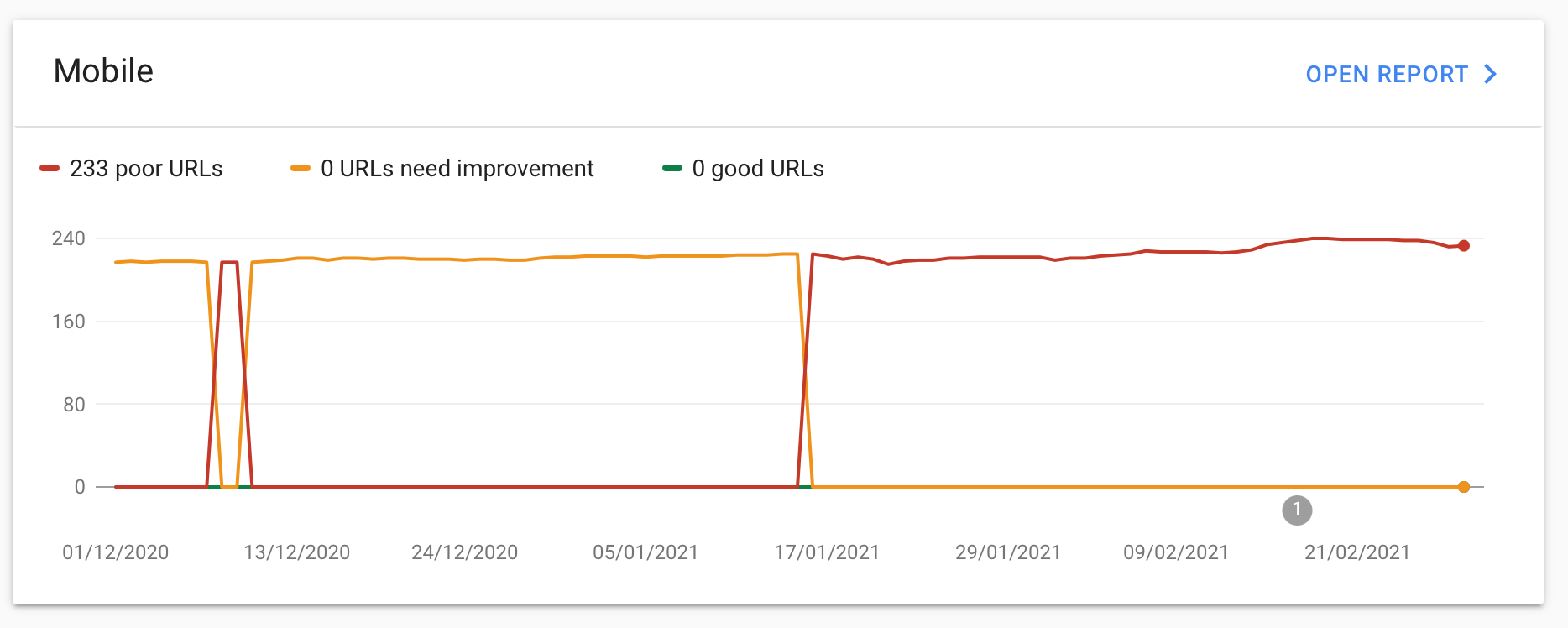
If all of (or your most important) pages are rated ‘Poor’, that’s literally Google telling you ‘MATE, YOUR WEBSITE ISN’T GOOD ENOUGH’. Now, I can say that kinda stuff to my clients all day long, but I’d bet you’ll pay attention when Google says it, right? At least, you should.
How to “Pass” Core Web Vitals
Now for the fun part.
How do you influence this rating? Googles idiot-proof scoring tool, PageSpeed Insights, gives you some suggestions (as well as a useful speed score of 0-100). Check it out. Or let us do the graft for you.
These suggestions on how to improve your site’s performance range from the relatively useful “serve images in next-gen formats” to downright developer speak “does not use passive listeners to improve scrolling performance”.
For the non-techies reading this post, if you’re at all worried about seriously improving your Core Web Vitals performance, you will likely need a web developer involved. We can help.
Some of these suggestions can be remedied fairly easily — compress an image here, remove unused plugins there, but some of them deal directly with your website server response, the way your website is actually built, the platform it runs on, and other technical ins and outs which are far outside the scope of this post.
What the hell are LCP, FID, and CLS
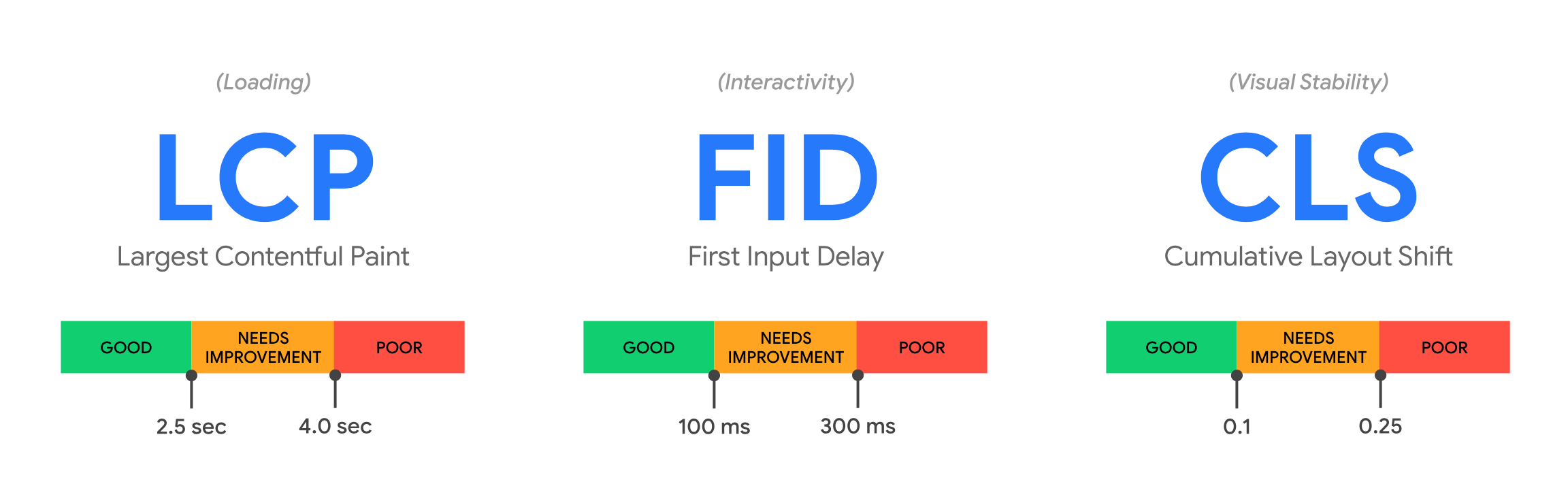
There are three main factors which determine your Core Web Vitals ‘good’, ‘needs improvement’ or ‘poor’ rating.
You really don’t need to know the nitty gritty of these, but think of them as the parts of the user experience of a website that Google is putting a benchmark on, and saying “You need to be at least this good”. But for the super-keen, here’s a little more on each of the factors, in an easier to understand phrasing:
“How fast does my page load”
This one is fairly obvious. For every second delay in mobile page load, conversions can fall by up to 20% (SOASTA, The State of Online Retail Performance, April 2017.)
“How long before I can accurately navigate a page”
First Input Delay (FID) is an important, user-centric metric … because it quantifies the experience users feel when trying to interact with unresponsive pages—a low FID helps ensure that the page is usable.
“How long before the page stops loading in stuff which makes the page jump around”
Layout shifts can be distracting to users. Imagine you’ve started reading an article when all of a sudden elements shift around the page, throwing you off and requiring you to find your place again. This is very common on the web, including when reading the news, or trying to click those ‘Search’ or ‘Add to Cart’ buttons. Such experiences are visually jarring and frustrating.
So.… should I be worried about Core Web Vitals?
As ever with my advice around SEO:
When thinking about SEO, do what’s best for your users, not what’s best for search engines. Most of the time, these two are one and the same.
Is your site objectively awful? Have you not upgraded your hosting since 2005? Did you get a bit carried away with the old pop-up plugins? Have you added a dozen ad units on each page? If the answer is yes, you might want to double check that score and see what you can do.
However — my hot take — Core Web Vitals is the latest Penguin, the latest page speed, the latest thin content, the latest ‘Google says do this’ that should be taken with caution, but not completely ignored.
If you’re in a competitive space with dozens of very close competitors fighting over the same keywords and highly profitable SERP space, you might wanna do your best here and try and score well. Core Web Vitals will really matter when choosing a winner between two very similar sites. Of course Google will choose the one that isn’t an ad-riddled, pop-up laden, poor experience.
Have you found a nice little niche that isn’t all that competitive? You’ll probably be OK. I wouldn’t lose sleep over it, but I wouldn’t ignore it either. For 95% of websites, you’re gonna be just fine. Just don’t be one of the 5%.
Still not absolutely sure?
Email me and I’d be happy to take a look at your site and give you some advice.
