
What is Google Search Console?
Google Search Console (GSC) is an essential tool when it comes to SEO, as it gives access to data from Google about your website’s organic performance. And the best part about it is, they give us this for FREE!
Google Search Console is a multipurpose tool for website owners, digital marketers, and SEOs, acting as a direct insight into your website’s performance within Google’s vast search ecosystem.
GSC is more than just a reporting tool; it’s a diagnostic platform that provides you with actionable insights, enabling us to understand how Google crawls, indexes, and presents our content to searchers.
What Can Search Console Do?
While GSC does track key metrics like how your site shows up in Google’s SERPs in the form of impressions, clicks, click-through rate, average position and user experience (Core Web Vitals, its true value lies in its ability to dissect and contextualise this data.
Search Console’s Functionality:
- Index Coverage and Sitemaps:
- GSC is how you submit XML sitemaps, which are vital for showing search engines how the structure of your website is defined.. This ensures that all important pages are discovered and indexed.
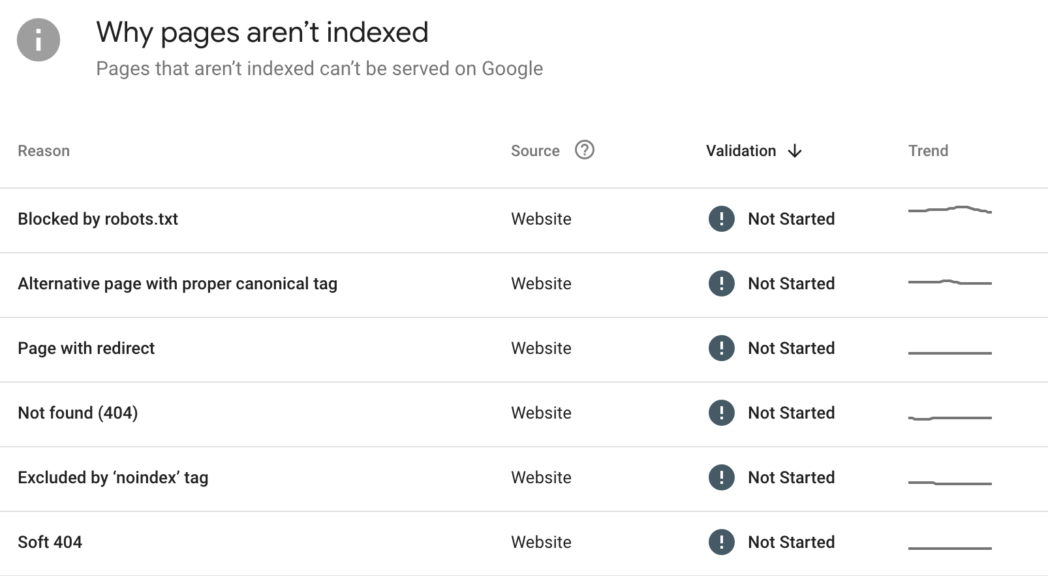
- The index coverage report reveals pages that Google has indexed, pages with errors that prevent indexing, and pages that are excluded for various reasons (e.g., duplicate content, robots.txt directives). This allows for rapid identification and resolution of indexing problems.
- Technical SEO Auditing:
- GSC goes beyond basic error reporting by providing insights into mobile usability, structured data markup, and security issues.
- The Core Web Vitals report is particularly useful, as it highlights pages that are struggling with loading speed, interactivity, and visual stability, which is an important factor in ranking..
- Enhancements reports show how google is using your implemented schema, and whether there are any errors.
- Performance Analysis:
- The performance report allows for simple analysis of search queries, pages, countries, and devices. This data can be used to identify keyword opportunities, optimise content for meeting user’s search intent, and track how any optimisations you’ve made are performing.
- By filtering by date range, you can see how changes to your website have affected your search performance. Adding filters to compare date ranges
- Security and Manual Actions:
- GSC provides alerts about security issues, such as malware or hacking attempts, ensuring that website owners can take immediate action to protect their sites and users.
- It also notifies users of any manual actions taken by Google, such as penalties for violating Google’s webmaster guidelines.
- URL Inspection:
- This tool allows you to inspect individual URLs, providing detailed information about how Google sees and renders your pages. This includes information about indexing status, mobile usability, and structured data.
How Search Console Gathers Data
One thing to be mindful of, when it comes to the data that you see in Search Console is that data is sampled. The indexing reports and video page reports provide the full range of data about these URLs whereas experience and other reports use a sample capped at 1000 URLs. This can lead to frustration for SEOs as you often find an issue within sample data but don’t get a full list of URLs to implement a fix. However as you fix a batch you can validate fixes and then if further URLs are impacted they should appear in the data.
The Benefits Of Search Console
That’s what Search Console does, so what are the benefits and why should you be using it?
Tracking the Organic Visibility of the Site
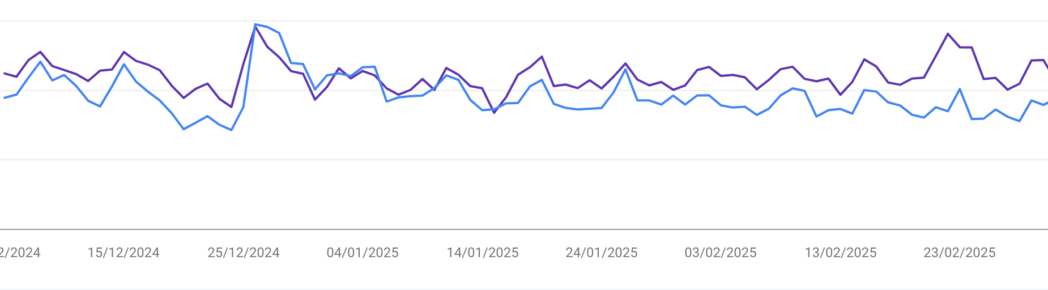
Tracking your site’s organic visibility in the form of clicks and impressions is arguably the most usable and accessible feature of GSC. Visibility is how present your site is in Google’s SERPs, the data provided helps you identify what’s working and where you can find opportunities to improve.
The data lets you apply filters so you can compare two time periods of data to see whether there have been drops in performance whether that’s in clicks or impressions. The page indexing data helps to identify whether pages with value that should be indexed are being indexed and provides a chance to look at improving this.
We can’t emphasise just how often we use GSC here at BFBC, it’s an absolute must use.
Monitor Keyword Performance
The performance tab of Search Console gives you access to data about the queries your site shows up for in search. These queries are keywords and you can understand how many clicks and impressions a keyword gets. You can get data on average position in Google search, and click through to the site. You can drill further into this in terms of dates, pages, countries and device.
Monitor Indexation
Indexation is the process of how search engines such as Google discover, analyse, and store web page information. Crawlers or bots explore the internet, analysing content and storing it in a huge index. Unindexed sites won’t show in search results which means they won’t get organic traffic. The structure of your site, sitemaps, technical health and content quality are all factors that impact indexation.
When you launch a site or add new pages, you want to make sure that they’re indexed. The indexation reports are the place to check if your pages are indexed by Google. This report lets you see how many pages currently appear in search results. This is handy as it allows you to see whether new content is appearing, or whether older obsolete pages are still being indexed. Reviewing this data and either submitting new URLs through the inspect tool.
Find and Diagnose Crawl Issues
If your site is experiencing 404s (pages not found), server errors or other crawl problems then these can impact organic performance and usability. If server errors are stopping your site being live, you can get an idea of if this happens regularly and change your hosting situation. Broken pages and links are poor for user experience and a waste of crawl budget. Search console identifies these errors and allows you to monitor issues, and work to fix them. It’s with noting the faster your site loads and is accessible to crawlers the better it is for crawling. You can also use this data to ensure that pages that shouldn’t be crawled are not crawled.
Monitor Mobile Performance
Core Web Vitals is a key set of metrics used by Google to measure user experience. This is focused on on load time, interactivity, and stability of content as it loads.
Search Console gives us detailed insights into Core Web Vitals for desktop and mobile users of the site. This allows us to see which URLs are in need of improvement and what is holding them back. Better performance and better usability means that users will stay on site and come back, and search engines can navigate your site more easily.
Monitor Backlinks
Backlinks are an important part of SEO and help build trust and authority for your site. The backlink report in GSC shows which domains link to your site, the anchor text used and which pages have the most inbound links. Knowing what your backlink profile looks like helps you decide where the opportunities lie to improve it by acquiring more links.
If we’ve not made it clear, we couldn’t live without search console for our SEO campaigns. The data gives us a useful insight into the mechanics of whats happening with sites within search engines. Want to know what search console is telling us about your website’s performance? Get in touch today!
